How to Set Up Your Laptop Without Trashing Your Cervical Spine
It was a typical morning, and I was deep into my work when an unexpected sharp pain shot through my neck. I had been sitting at my desk, laptop loaded, with poor posture habits I didn’t even realize I had. That moment was a wake-up call. I realized that my relentless pursuit of productivity was silently wrecking my cervical spine, and I wasn’t alone in this. Many of us sit for hours, hunched over our devices, risking chronic neck and back pain that can eventually limit our mobility and quality of life.
Why Your Laptop Setup Might Be Betraying You
Believe it or not, the way you position your laptop every day can have a profound impact on your spinal health. When I first started working from home, I thought hunching over my keyboard was just a temporary bad habit. But over time, I noticed increased tension headaches, stiffness, and even numbness in my arms. The hard truth is, many of us are unknowingly setting ourselves up for long-term problems with poor ergonomic choices. This isn’t just about comfort—it’s about preventing pain, disability, and even chronic conditions that can cripple your mobility.
Research shows that poor posture while working can lead to a 40% increase in neck discomfort over just a few months, and these issues tend to become more stubborn over time (source). That’s a statistic that hit home for me, and it might resonate with you too. My initial mistake was ignoring the importance of proper setup—thinking a makeshift desk arrangement would do. Trust me, I paid the price. But the good news is, with a few adjustments and consistent habits, I’ve managed to turn things around and protect my cervical spine.
What We’ll Cover Today
In this post, I’m going to share practical, proven strategies to set up your workspace correctly, so you can work productively without compromising your neck and back health. We’ll go beyond generic advice and focus on actionable steps tailored to real-life scenarios. Whether you’re sitting at a dedicated home office or just trying to improve your existing setup, these tips will help you avoid the common pitfalls that I fell into early on.
So, if you’ve ever experienced that familiar neck stiffness or been worried about future discomfort, stay tuned. We’ll address all your concerns and make sure you’re equipped with easy-to-implement solutions that safeguard your spine while you work. Ready to stop sacrificing your health for productivity? Let’s dive into how you can sit smarter, and move better, starting today.
Understanding the Risks of Poor Laptop Ergonomics
If you’ve faced persistent neck pain or headaches, you’re not imagining things. Poor ergonomics isn’t just uncomfortable—it can cause real harm. As an enthusiast in spinal health, I learned the hard way that neglecting proper setup can accelerate degeneration and lead to chronic issues. For example, using a laptop directly on your lap or desk without proper supports can force your head into an unnatural angle, increasing strain on your cervical spine. That’s why it’s crucial to understand the core risks and how proper positioning can prevent them. Want to learn how to avoid these mistakes and protect your spine long-term? Keep reading!
Adjust Your Screen Height for Optimal Alignment
Set your monitor so that the top of the screen is at eye level, about 2-3 inches above your neutral gaze. When I first tried this, I used a couple of books under my laptop, and immediately noticed my neck no longer tilted forward during long work sessions. This simple tweak prevents your head from jutting forward, reducing cervical strain. Remember, the goal is to keep your neck in a neutral position, not extended or flexed.
Position Your Keyboard and Mouse to Keep Wrists Straight
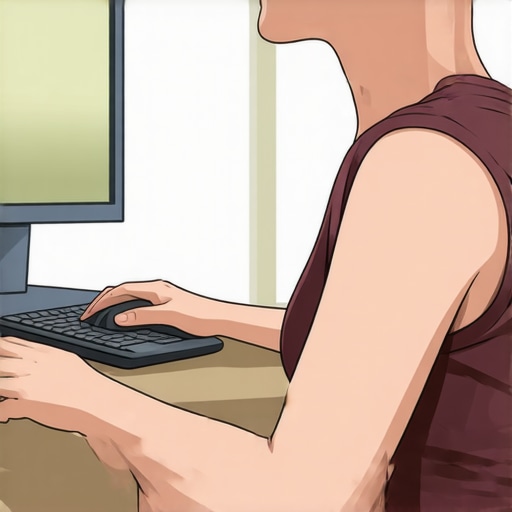
Place your keyboard directly in front of you at a height where your elbows are bent at roughly 90 degrees. Avoid reaching forward or hunching your shoulders. I once resorted to stacking boxes to elevate my laptop, which was awkward at first, but I soon learned that a proper keyboard setup keeps your shoulders relaxed and your arms supported, preventing upper back and neck tension. Use a wrist rest if needed, but ensure your wrists stay straight during typing.
Use an Ergonomic Chair That Supports Your Lumbar
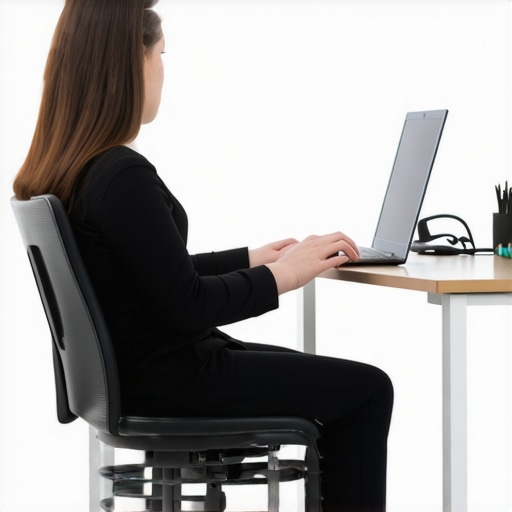
A good chair with lumbar support encourages a healthy curve in your lower back, which in turn supports your upper spine. When I upgraded my chair, I found my overall posture improved dramatically. Sit back so your lower back is supported, and your chair height allows your feet flat on the floor, reducing stress up the chain to your neck and shoulders. This setup minimizes the tendency to slump or hunch forward, critical for cervical health.
Practice Micro-Adjustments Throughout the Day
Set reminders to check your posture every 20 minutes. Shift your position slightly, stretch your neck gently, and reset your equipment if needed. I incorporated a quick deep breathing exercise to relax shoulder tightness during these checks; it’s a habit I adopted after reading about how breathing techniques can release lower back tension (source). Tiny adjustments reduce muscular fatigue and prevent bad habits from setting in.
Incorporate Movement Breaks to Alleviate Spinal Stress
Stand up, walk around, or perform gentle stretches at least once every hour. During one particularly intense workday, I paused to do the ‘dead bug’ exercise, which I found helps to stabilize my spine and reduce discomfort. Regular movement prevents stiffness, keeps your joints lubricated, and encourages circulation, which is vital for spinal health. Consider creating a routine like stretching your hamstrings or rolling your shoulders to counteract sitting-related stiffness.
Utilize Proper Lighting and Reduce Glare
Working in well-lit conditions with minimal glare reduces eye strain, encouraging you to maintain a better head posture without leaning forward or squinting. I learned this after experiencing headaches that prompted me to adjust my blinds and switch to softer bulbs. Less eye fatigue equates to less tendency to crane your neck forward in search of clearer vision, thereby protecting your cervical spine.
Keep Essentials Within Easy Reach
Arrange your frequently used items so you don’t have to stretch or twist unnaturally. This prevents overreaching, which can destabilize your posture. I once kept my phone across the desk, constantly twisting my neck to glance at it, which aggravated my neck pain. Moving it closer made a significant difference in maintaining a neutral spine throughout my workday, as highlighted in our core techniques.
In Summary
Implementing these ergonomic adjustments takes discipline but offers substantial benefits. By integrating proper screen height, supportive seating, micro-adjustments, movement, lighting, and accessibility, you proactively shield your cervical spine from unnecessary strain. These steps are practical, effective, and rooted in spinal health principles, guiding you toward a healthier, pain-free workspace.
Many people believe that chiropractic care is a quick fix for neck and back pain, but this oversimplification often leads to misunderstandings about its true nature. One common misconception is that chiropractors only manipulate spinal joints to provide immediate relief, but in reality, effective chiropractic treatment involves a comprehensive approach that addresses underlying causes, including postural imbalances and functional mobility issues (learn more about restoring mobility here). A crucial nuance many overlook is the importance of assessing the entire kinetic chain rather than focusing solely on symptomatic areas, which can lead to overlooked problems that worsen over time. For example, a stubborn neck pain might actually originate from poor hip mobility, highlighting the necessity of holistic evaluation. This interconnectedness is backed by research indicating that addressing global movement patterns yields better long-term outcomes (discover advanced techniques here).
A trap many fall into is undervaluing mobility exercises, assuming they are just warm-up routines rather than vital components of treatment. This mistake can hinder progress because improving joint and muscle function is essential to sustain adjustments and prevent recurrence. For instance, neglecting targeted mobility work can cause joint stiffness, undermining the benefits of chiropractic adjustments and prolonging recovery (explore mobility-enhancing strategies).
What about the myth that chiropractic adjustments are risky or unsafe? While some believe adjustments may cause harm, empirical evidence overwhelmingly supports their safety when performed by trained professionals. A landmark study found that serious adverse events are exceedingly rare (review expert safety tips here), and most patients experience significant relief without complications. However, it’s vital to avoid attempting self-adjustments or relying solely on online videos, as improper technique can cause injury. This is a crucial point for advanced readers: understanding the biomechanical principles behind safe adjustments can prevent unnecessary risks and optimize outcomes.
While many focus on symptomatic relief, true progress depends on addressing the root causes. For example, persistent back pain often results from poor movement patterns and muscular imbalances that require targeted intervention. An integrated approach, combining chiropractic adjustments with personalized mobility and strengthening routines, offers the best chance at sustained health (master the art of lasting relief).
Have you ever fallen into this trap of assumptions about chiropractic care? Let me know in the comments, and stay tuned for more insights on how to leverage advanced strategies for better mobility and pain relief.
Maintaining your spinal health over the long term requires more than just good posture habits; it demands reliable tools and consistent routines. As someone deeply invested in preventing neck and back pain, I’ve curated a set of practical, evidence-based equipment and techniques that I personally use daily to keep my spine functioning optimally.
Invest in a Quality Lumbar Support Cushion
For me, a well-designed lumbar support cushion is non-negotiable. I prefer the Herman Miller Rose Chair because it provides adjustable lumbar support, aligning my spine naturally during extended work sessions. Proper lumbar support prevents slumping, reducing strain that often accumulates in the cervical and lumbar regions. If you’re budget-conscious, consider a memory foam cushion tailored to your chair—just ensure it promotes the natural curve of your lower back.
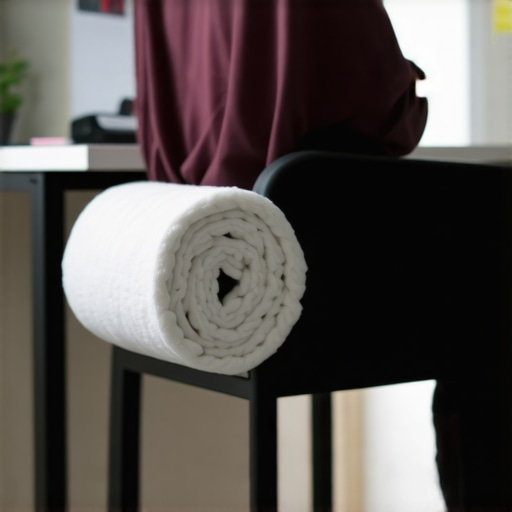
Use a Cervical Roll for Neck Alignment
This is a simple, yet powerful device I keep at my workspace. The cervical roll helps me maintain a neutral neck position, especially during prolonged sitting. When I feel my neck fatigue, I reposition the roll to support the cervical lordosis—a critical factor in preventing forward head posture. This small tool can significantly reduce cervical strain, making it a staple in my daily routine. For maximum benefit, combine its use with regular micro-movements like chin tucks or gentle stretches, as outlined in our expert methods guide.
Incorporate Mobility Enhancing Devices
Tools like the Foam Roller are often misunderstood. I recommend the foam roller with caution—avoiding rolling the lower back directly, which can cause harm. Instead, I focus on foam rolling my thoracic spine to improve overall mobility. As research suggests, improved thoracic mobility can alleviate undue stress on the cervical and lumbar areas, aiding long-term health (learn more here). Incorporate gentle rolling sessions into your weekly routine to promote flexibility and pain-free movement.
Leverage Technology for Postural Monitoring
Smartphone apps like Upright Posture help me stay conscious of my alignment throughout the day. Using real-time feedback, I adjust my posture immediately, preventing habitual slouching. These tools are especially useful for those who work remotely, where oversight is minimal. Pairing app alerts with ergonomic adjustments makes long-term maintenance more manageable, turning good habits into second nature.
Looking ahead, I believe wearable technology with biofeedback capabilities will become even more sophisticated, offering personalized correction prompts and data-driven insights. Until then, integrating these tools into your daily routine offers a practical way to sustain mobility and prevent chronic pain.
How do I maintain my mobility routines over time?
Consistency is key. I set aside 10-minute sessions at the start and end of each workday for mobility drills, including spinal drills like the dead bug exercise and thoracic stretches. Using a combination of physical tools, ergonomics, and technology, I’ve created a holistic approach that adapts as my body needs evolve. Regular check-ins—either via self-assessment or professional evaluations—ensure these tools continue to serve me well. Keep track of your progress and don’t hesitate to adjust your tools or routines based on feedback.
To get started, pick one tool from this list—perhaps a lumbar support cushion or a postural app—and commit to using it daily for a week. Observe how your body responds, and gradually build your comprehensive maintenance routine. Remember, the goal is sustainable, pain-free mobility that supports your active lifestyle long-term.
Lessons I Stumbled Over That Changed My Approach to Spinal Care
- The Power of Consistency Over Quick Fixes: I realized that daily small adjustments and mindful habits have a far greater impact on long-term spinal health than sporadic treatments or shortcuts. Genuine progress comes from sustained effort, not temporary relief.
- Holistic View Trumps Isolated Treatments: Focusing solely on the painful area misses the bigger picture. Addressing movement patterns, posture habits, and muscle imbalances transformed my understanding of effective spinal care.
- Understanding My Body’s Language: Listening to subtle cues—like slight stiffness or tension—enabled me to intervene early. Becoming more aware prevented minor issues from developing into chronic problems.
My Go-To Tools for Lasting Back and Neck Wellness
- Ergonomic Workstation Setup: Investing in a good chair with lumbar support and a height-adjustable desk revolutionized my posture. I trust the foam roller with caution for mobility work, especially targeting thoracic flexibility.
- Postural Monitoring Apps: Using tools like smartphone apps helps me stay conscious of my alignment. Real-time feedback keeps habits in check and prevents slump formation.
- Targeted Mobility Devices: Cervical rolls and lumbar cushions are staples. They assist in maintaining proper spinal curves during prolonged sitting, which significantly reduces discomfort.
- Regular Movement Routines: Short, daily stretching and activation drills, such as the dead bug or thoracic rotations, keep my spine resilient and mobile. Routine check-ins ensure I preserve the gains I make.
Believe in Your Body’s Capacity to Heal and Evolve
It’s easy to think pain is a sign of inevitable decline, but I’ve learned that your spinal health hinges on mindful choices, consistent effort, and the right tools. Every small reinforcement builds toward a stronger, more flexible spine equipped to handle life’s challenges. The journey isn’t about quick fixes but about fostering habits that sustain mobility and comfort for decades to come.
If you’ve been hesitant to invest in ergonomic improvements or mobility routines, remember: each step forward is a vote for your future well-being. Your spine is an incredible structure capable of remarkable recovery when nurtured with knowledge and care. Don’t wait for pain to become unmanageable—start today, and watch how your resilience grows over time.
What small change will you commit to this week to improve your spinal health? Share your plan below and let’s empower each other on this journey toward lasting mobility.