How to Prop Your Tablet Without Straining Your Wrists
I’ll never forget the night my iPad decided to introduce itself to my face. I was lying in bed, deep into a true-crime marathon, holding the device up with one hand. Suddenly, my wrist didn’t just feel tired—it felt like it had short-circuited. A sharp, electric zing shot through my palm, and the tablet slipped from my grip, thudding painfully against my nose. It wasn’t just an embarrassing moment of klutziness; it was the final warning from a body that was tired of being treated like a piece of structural scaffolding. If you’ve spent your evenings shaking out your hands or noticing a persistent dull ache in your forearm, you’re experiencing what I call “The Tablet Toll.” Today, I’m sharing the hard-won secrets that saved my joints so you can keep your screen time without the physical price tag.
Stop Holding Your Tablet Like a Heavy Pizza Slice
Early in my journey to better mobility, I made a massive mistake: I assumed that because a tablet is light, it couldn’t possibly cause real damage. I spent months in “the claw,” that awkward one-handed grip where the thumb does 90% of the heavy lifting. I ignored the signs until my hand started tingling at dinner. It’s a common trap; we focus so much on our office setup that we forget why your couch is the worst place for your spine and your wrists. According to the Mayo Clinic, repetitive strain injuries often stem from maintaining awkward positions for too long, which is exactly what happens when we try to balance a device on a soft, uneven surface. I realized that my wrist pain wasn’t just a localized issue; it was a symptom of a larger posture problem. In fact, many people don’t realize that thumb pain is actually coming from your neck more often than you’d think. By propping the tablet correctly, you aren’t just saving your wrist; you’re protecting your entire upper chain.
Your Hand Needs a Break from the Death Grip
The fix isn’t just about finding a random object to lean your screen against. I tried using a stack of books, a coffee mug, and even a bag of flour once. None of them worked because they didn’t address the viewing angle, which led to me hunching over like a gargoyle. You have to understand how to read on a tablet without straining your neck if you want your wrists to feel better, as the two are inextricably linked. When your neck is forward, your nerves can get compressed, making your hands feel weak. I also found that my desk chair height is ruining your forearms during the day, which meant my wrists were already “pre-fatigued” by the time I picked up my tablet at night. Have you ever felt like your hands were just “done” before you even finished your first email of the evening?
Is all this ergonomic gear actually worth the hype?
I used to be the biggest skeptic. I thought “ergonomic” was just a fancy word companies used to add fifty bucks to the price of a plastic stand. I was convinced I could “muscle through” the discomfort. I was wrong. The moment I invested in a proper wedge and started using the 30-second reset for tech neck fatigue, the difference was night and day. It’s not about buying the most expensive gadget on the market; it’s about creating a stable base that allows your muscles to go slack. If you’re still skeptical, try the 10-second stretch for people who type all day next time your wrist feels tight. You’ll see that the tension is real, and it’s avoidable. Let’s look at how we can set you up for success without turning your living room into a sterile clinic.I remember trying to read a long-form article while propped up on three pillows. Within ten minutes, my left arm felt like a lead weight. That’s when I realized: your body isn’t meant to be a tripod. The first rule of pain-free tablet use is to separate the holding from the viewing. You need to get the device off your palms and onto a surface that doesn’t breathe.
Let Your Furniture Do the Heavy Lifting
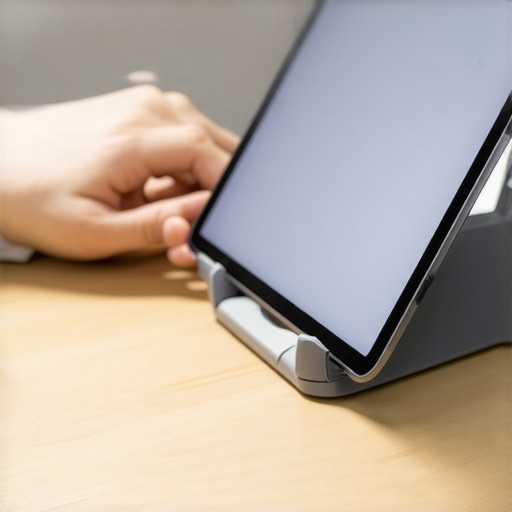
The goal is to get your tablet as close to eye level as possible without using your muscles to keep it there. If you’re sitting on the couch, don’t just lay it on your lap. This forces your neck into a “C” shape that puts up to 60 pounds of pressure on your cervical spine. Instead, use a firm wedge pillow or a dedicated tablet stand. I once tried to MacGyver a setup using a cereal box and some duct tape. It was a disaster—the tablet slid off and hit my cat—but it taught me that stability is king. When the device is stable, your hands can finally drop to your sides, which is essential because why your shoulder feels heavy after typing is often the same reason it aches after holding an iPad.#IMAGE_PLACE_HOLDER_B#
Find the Sweet Spot for Your Sightline
Positioning the screen is only half the battle. If you’re still looking down, you’re inviting “tech neck.” I learned the hard way that why your neck clicks when you turn your head to the left often starts with these micro-tensions we ignore. Use the 5-minute doorway stretch for rounded shoulders to reset your frame after a long session. The key is to keep your chin tucked slightly, rather than jutting it forward toward the screen like a turtle.
Break the Static Cycle with Active Resets
Static load is the silent killer of joints. Even with a perfect stand, if you don’t move, you’ll stiffen up. I now set a timer for every 20 minutes. When it dings, I don’t just stop; I move. It’s like clearing a “cache” of physical tension. I’ve found that applying the 20-20-20 rule for desk workers and neck health works just as well for tablet binging as it does for office work.
Treat Your Forearms Like an Athlete Would
Your forearms are essentially the cables that operate your fingers. If they are constantly under tension, they’ll fray. I started incorporating a specific routine to how to stretch your forearms to prevent elbow and neck strain, and the “zing” in my palm disappeared within a week. Think of these stretches as a “cool down” for your nerves. If you’ve been scrolling for an hour, your tendons are literally hot from friction and constant contraction.
Watch Your Grip in the Wild
When you absolutely have to hold the device—say, on a plane or a bus—switch hands every five minutes. It sounds tedious, but it prevents one side from taking the brunt of the load. I used to be a right-hand purist until I realized my right shoulder was significantly lower than my left. By alternating, you force your brain to engage different stabilization muscles, keeping your spine from “locking” into one skewed position.Let’s dig deeper into why simply alternating hands isn’t a magic bullet for long-term relief. Most people think the solution to ‘tech neck’ is to pull their shoulders back and sit like a West Point cadet. I used to do this myself—I would pin my shoulder blades together until I looked like I was bracing for impact. But here is the hard truth: stiffness is not stability. When you force yourself into a perfectly upright position, you are actually creating a different kind of disaster. I’ve found that why sit up straight is actually bad advice for some is one of the most misunderstood concepts in modern ergonomics. It creates a ‘frozen’ spine, which is just as damaging as a slumped one. Your body craves variability, not a static 90-degree angle. 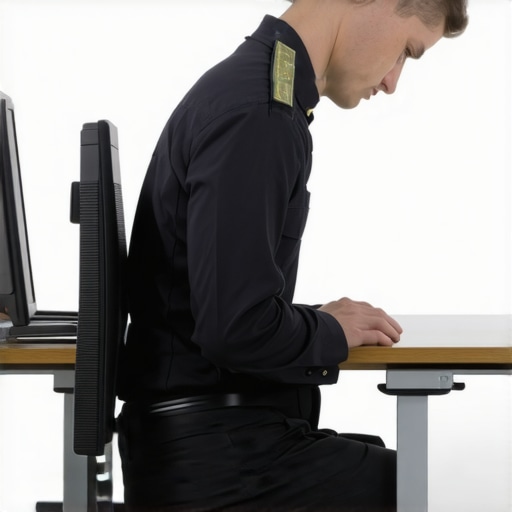
The hamstring stretch trap you are probably falling for
Another common mistake is thinking that if your back hurts, your hamstrings must be tight. I spent years religiously touching my toes, thinking it would ease my lumbar tension. It did not. In fact, why stretching your hamstrings won’t fix your back pain is because your brain might be keeping those muscles tight to protect a vulnerable spine. If you keep pulling on them, you are essentially tugging on a frayed rope. Often, the real culprit is that your glutes won’t fire, leaving your lower back to do all the work. It is a classic case of looking at the symptom rather than the source. Have you ever spent weeks stretching a ‘tight’ muscle only to have it feel even worse? Let me know in the comments.
Why does my mid-back feel stuck even when my neck is the part that hurts?
This is the ultimate nuance of spinal health. The body works like a chain; if one link is rusted shut, the links above and below have to move twice as much to compensate. Research published in the *Journal of Orthopaedic & Sports Physical Therapy* suggests that addressing thoracic (mid-back) mobility is often more effective for neck pain relief than treating the neck alone. If your mid-back is a brick wall, your neck becomes a hyper-mobile hinge. To fix this, you need the single best exercise for thoracic mobility to restore that central rotation. Without it, you are just putting a band-aid on a structural leak.
Your strong core might be part of the problem
Here is a contrarian view: sometimes, being ‘too strong’ is a liability. I see plenty of athletes who have ‘braced’ their way into chronic pain. They have been told to ‘keep the core tight’ for so long that they have lost the ability to breathe naturally. I realized that why your strong core might actually be too rigid is because you have turned your torso into a cylinder of stone. This rigidity prevents the micro-adjustments your vertebrae need during daily life. Even in the gym, things like the truth about weightlifting belts and spinal stability show that external support shouldn’t replace functional movement. Real mobility is about control, not just raw tension. There is a hidden link between neck pain and spinal health that relies on fluidity. If you are constantly ‘on,’ your nerves never get a chance to reset. Have you ever fallen into the trap of over-correcting your posture only to end up more tired? I would love to hear your story.
The Three Gadgets That Actually Saved My Spine
I finally stopped trying to be a hero and started using tools that worked with my anatomy rather than against it. The single biggest game-changer for me wasn’t a fancy chair; it was a gooseneck tablet mount. I clamp this thing to my headboard or my side table, and it allows the screen to float exactly where my eyes naturally rest. By removing the need to grip the device, I eliminated the ‘death grip’ that was causing my forearm fatigue. This is a practical example of why chiropractic secrets to boost neck comfort and function often involve simply removing the physical stressor before it starts a fire in your nerves. I also started using a simple lumbar roll—or even a rolled-up towel—to maintain my lower back curve while lounging. It sounds low-tech, but knowing how to use a rolled-up towel to fix your cars lumbar support or your couch setup is the ultimate ‘hack’ for someone on a budget. 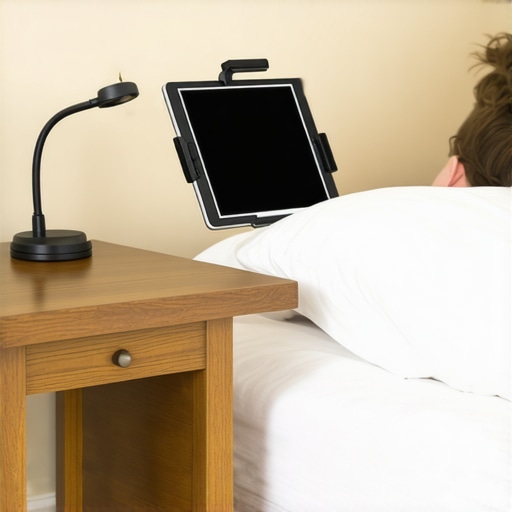
How can I stay pain-free without a home clinic?
Maintenance isn’t about hour-long stretching sessions; it’s about spinal hygiene. I treat my spine like my teeth—I brush off the ‘postural plaque’ throughout the day. According to a study published in the Journal of Manipulative and Physiological Therapeutics, regular spinal checkups and consistent ‘micro-breaks’ significantly reduce the incidence of chronic musculoskeletal pain in tech-heavy environments. I’ve realized that why your back feels better when you keep moving is due to the lubrication of the facet joints. If I’m stuck in a binge-watching loop, I’ll perform a few seated rotations every episode to ensure my mid-back doesn’t lock up. I also realized that why your office chairs armrests are hurting your neck is often because they push your shoulders into your ears—so I actually removed mine to allow my arms to hang naturally when I’m using my tablet at a desk.
Why Your Next Tablet Might Be on Your Face
If we look at where technology is heading, the ‘tablet toll’ might actually shift. With the rise of AR (Augmented Reality) and VR glasses, we will soon stop looking down at our palms and start looking straight ahead through lenses. While this solves the ‘tech neck’ problem of looking down, it will introduce new challenges for our deep neck stabilizers. I predict the next decade of wellness will focus heavily on revitalize your mobility proven strategies for back pain relief that specifically target the suboccipital muscles at the base of the skull. We are moving from a world of ‘slumping’ to a world of ‘fixed gazing,’ and our spines will need to adapt.
Stop the Tension Before It Becomes Permanent
My challenge to you today is to stop being a tripod for your tech. If you’re reading this on a handheld device right now, put it down and try the 30-second ‘Wall Slide.’ Stand against a wall, tuck your chin, and try to make the back of your neck touch the flat surface. It’s a reality check for how far forward your head has drifted. Incorporating mastering back neck pain relief tips from the pros isn’t about a one-time fix; it’s about choosing a setup that respects your body’s limits. Grab a stand, roll up a towel for your lower back, and give your joints the break they deserve.
The Hardest Lessons My Wrist Taught Me About Tablet Use
The most important thing I realized is that ‘rest’ doesn’t always equal ‘recovery.’ Just because you put the tablet down doesn’t mean the micro-tears in your tendons have magically healed. I used to think I could out-stretch a bad habit, but the real secret is the Micro-Movement Rule. Instead of holding a static pose for an hour, I now change my seating angle every single chapter or video. Another lightbulb moment was discovering that my wrist pain was actually a ‘downstream’ effect of my ribcage being locked up. When your chest doesn’t move when you breathe, your shoulders hike up, and your arm nerves get cranky. Understanding these chiropractic secrets to boost neck comfort and function changed my perspective from fixing a ‘sore hand’ to maintaining a whole-body system.
Tools That Actually Earned a Spot on My Nightstand
I’ve cleared out the clutter and narrowed it down to three essentials. First, a heavy-duty gooseneck mount is non-negotiable if you read in bed—it’s the only way to keep your arms at your sides where they belong. Second, I swear by a simple silicone ‘grip loop’ on the back of my device; it allows my hand to stay open and relaxed rather than pinching the edges. Lastly, I keep a physical copy of a mobility guide nearby to remind me to move. #IMAGE_PLACEHOLDER_E# If you are looking for a comprehensive plan, I highly recommend exploring mobility mastery expert tips for back pain prevention and recovery. These aren’t just gadgets; they are investments in your ability to enjoy technology without the physical fallout. You can also find great advice in unlock neck pain relief essential chiropractic tips for 2025 to stay ahead of the curve.
Reclaiming Your Comfort One Swipe at a Time
Your relationship with your tablet shouldn’t be a source of dread or physical pain. By making these small adjustments, you’re not just avoiding a temporary ache; you’re protecting your long-term mobility. It takes exactly 21 days to build a new habit, so start today by propping that screen up and letting your muscles relax. Incorporating boost your back health simple yet effective chiropractic hacks into your daily routine will ensure you can keep scrolling for years to come. Your body is incredibly resilient—it just needs you to stop using it as a tablet stand.
What’s the most ridiculous object you’ve ever used as a makeshift tablet stand? Tell me your ‘MacGyver’ stories in the comments below!