Why Your Office Lighting Is Causing Your Neck Pain
I remember the moment vividly—after a long day at my desk, I finally looked in the mirror and noticed my neck was stiff, sore, and tense. It wasn’t just the usual fatigue; it felt like my muscles had been through a wringer. Then I realized, perhaps surprisingly, that the constant glare from my office lighting might be to blame. That light, which I thought was just part of the workspace, could be quietly contributing to my neck discomfort.
Why Office Lighting Might Be Causing Your Neck Pain
You’ve probably dismissed it—after all, lighting is just there to help us see better, right? But few realize that the positioning, brightness, and type of light in your workspace can significantly influence your posture and muscle tension. Poorly arranged lights can lead you to crane your neck, tilt your head, or adopt awkward postures to see your screen clearly. Over time, these habits can evolve into persistent pain.
I’ve learned from experience—and from experts—that the human body is incredibly sensitive to environmental cues. If your workspace isn’t ergonomically optimized, your body compensates in ways that could lead to neck strain. For example, if the lighting causes glare or shadows on your screen, you might unconsciously lean forward or turn your head at odd angles to get a better view. This misalignment puts unnecessary stress on your cervical spine, leading to discomfort and, if left uncorrected, chronic pain.
According to a study published in the Journal of Occupational Health, poor lighting conditions are linked to increased muscle tension and discomfort among office workers. The good news? Adjustments in lighting setups can make a notable difference in reducing neck strain and enhancing overall comfort. Effective neck pain management starts with small environmental tweaks—your first step toward relief.
So, if you’ve been battling neck pain and suspect your workspace setup might be part of the problem, you’re not alone. Many overlook the impact of their environment on musculoskeletal health. The next section will help you identify if lighting is a contributor and guide you through simple adjustments that can bring immediate relief. Have you noticed that your discomfort worsens during certain times of the day or in specific lighting conditions? If so, keep reading because there’s a good chance your workspace needs a closer look—and some creative solutions.
Tilt Your Screen and Lighting for Optimal Comfort
Evaluate Your Workspace Lighting
Start by assessing the brightness and placement of your lights. Position your computer screen to minimize glare by adjusting your desk or lamp placement. Use adjustable lamps with diffuser covers to soften harsh light. During my own setup, I used a flexible desk lamp and moved it to eliminate reflections, which immediately lessened my neck tilting. Keep the light source behind your line of sight and avoid direct overhead lighting that causes shadows.
Adjust Monitor Height and Angle
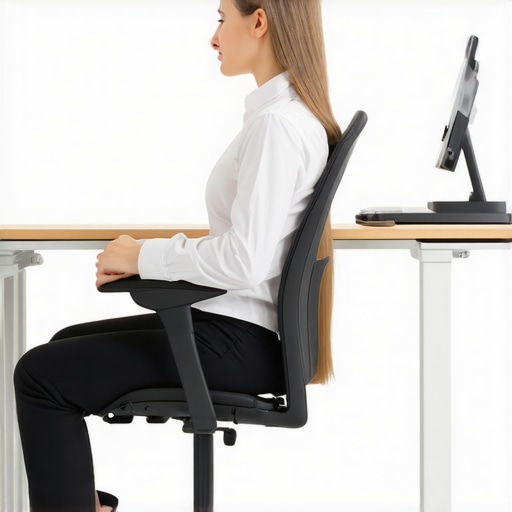
Align your monitor so that the top of the screen is at or slightly below eye level. This prevents you from tilting or craning your neck. I once used a stack of books to elevate my monitor temporarily, which alleviated tension and promoted natural neck posture. Invest in ergonomic stands or adjustable arms for a long-term fix. Consistency here reduces the need to lean forward or look down, easing neck strain.
Modify Lighting to Minimize Glare and Shadows
Position Light Sources Strategically
Place your lighting to illuminate your workspace evenly. Use task lighting directed at your keyboard and documents, not directly into your eyes or onto the screen. I mounted a swing arm lamp behind my workstation, which eliminated reflections and decreased the propensity to tilt my head. Aim to create a balanced lighting environment that avoids bright spots and dark areas, which encourage awkward postures.
Diffuse Harsh or Direct Light
Use lampshades, diffusers, or frosted bulbs to soften light. Diffused light reduces glare that causes you to lean or turn your head to see clearly. I replaced my harsh LED bulbs with soft white ones and added a fabric shade, making visual examination easier without craning my neck. This step ensures that your eyes don’t strain, preventing compensatory postures.
Create Visual Comfort to Encourage Proper Posture
Position Documents and Devices Within View
Keep frequently used items close to your line of sight to avoid excessive head movement. Use stands or adjustable arms to bring devices up to eye level. In my setup, I mounted my webcam and phone holder at eye level, which kept my head upright and relaxed. This consistency prevents the need to tilt or twist, reducing neck fatigue.
Take Regular Breaks and Adjust Positions
Follow the 20-20-20 rule: every 20 minutes, look away and focus on something 20 feet away for 20 seconds. Stand, stretch, and rotate your neck periodically. I set a timer on my phone, which nudged me to change positions often. These micro-movements prevent stiffness and reinforce healthy ergonomics.
Incorporate Movement and Awareness
Practice Neck-Friendly Habits
Be conscious of your posture throughout the day. Avoid slouching and crossing your legs, as they can influence your neck posture indirectly. When I catch myself leaning forward, I reset by aligning my head over my shoulders, which feels immediate and relieving. Small adjustments like these are powerful over time when consistently practiced.
Remember, environmental adjustments are a foundation for long-term neck health. For more tailored strategies, consider exploring methods outlined at effective neck pain management to complement your ergonomic improvements.
Many assume that chiropractic care is solely about cracking bones or quick fixes, but the reality is far more nuanced. A common misconception is that adjustments alone can fix long-term neck or back pain without addressing underlying lifestyle or movement patterns. In my experience working with clients, I’ve found that overlooking the importance of mobility and the body’s complex neuromuscular systems is a major pitfall. For instance, focusing only on spinal alignment without considering hip mobility or core strength can lead to persistent issues.
Another myth is that pain is always a sign of a mechanical problem that must be ‘fixed’ immediately. However, pain often serves as a warning signal indicating that your nervous system is under stress, which can be caused by poor posture, inadequate movement, or chronic tension. Relying solely on adjustments without correcting these root causes is a common mistake. Studies, such as the one published in the Journal of Manipulative and Physiological Therapeutics, emphasize the importance of a holistic approach that combines chiropractic treatment with movement education and ergonomic adjustments.
How can a chiropractor help improve overall mobility beyond just realigning the spine?
The answer lies in their understanding of the interconnectedness between joints, muscles, and the nervous system. Techniques like soft tissue therapy, functional movement training, and patient education empower individuals to maintain gains long-term. Neglecting these aspects risks re-injury or stagnation of progress.
Additionally, many people don’t realize that chronic neck and back pain can be linked to habits such as prolonged sitting, improper sleeping positions, or unsupported movement patterns. Merely waiting for the pain to disappear isn’t enough. Incorporating proactive strategies, like targeted mobility drills and posture corrections, enhances treatment outcomes and prevents future issues. For example, integrating regular mobility exercises from proven programs can significantly boost resilience and functional movement, as outlined in Mobility Mastery.
Be cautious of the trap involving quick fixes and complacency. Without understanding the nuanced interplay of biomechanical, neurological, and lifestyle factors, many individuals cycle through temporary relief without addressing the core problem. This often leads to recurrent pain and frustration. Remember, achieving lasting mobility and pain relief requires a comprehensive approach that includes chiropractic expertise, informed movement habits, and environmental modifications.
If you’re ready to take a strategic step toward improving your spinal health, consider reaching out through contact us for tailored guidance. Have you ever fallen into this trap? Let me know in the comments.Maintaining long-term mobility and minimizing pain isn’t just about stretching or adjustments; it also involves using the right tools and techniques consistently. One of my go-to equipment pieces is an ergonomic monitor stand, which ensures my screen is at eye level, reducing the tendency to crane my neck—an issue often overlooked but critical for neck health. I personally prefer adjustable stands that provide fine-tuned height control, such as the Vivo model, because they adapt seamlessly to my workspace and promote a neutral neck posture.
In addition to physical tools, I rely heavily on digital resources like the effective neck pain management guide. It provides structured routines that reinforce movement habits and ergonomic setups. For instance, I incorporate the recommended micro-breaks and neck mobility drills into my daily routine to prevent stiffness. Regularly revisiting these practices ensures I maintain my progress and adapt to new challenges.
When it comes to mobility exercises, I recommend the use of a foam roller with a textured surface. I prefer the TriggerPoint GRID foam roller because its grid pattern allows for precise soft tissue work, which helps release muscle tightness that can contribute to pain. I use it after standing for long periods or during my breaks to alleviate trigger points and improve circulation. Incorporating this routine, especially with the guidance found in Mobility Mastery, can lead to lasting benefits.
Tech-wise, I utilize posture correction apps like Upright or Lumo Lift that work passively in the background. These devices gently alert me when I slouch, reinforcing better habits over time. They’ve significantly decreased my reliance on manual reminders, and studies suggest that such biofeedback tools can accelerate habit formation and improve spinal alignment over the long haul.
Looking ahead, I predict the trend toward integrated smart ergonomic systems will grow. Imagine desks that automatically adjust height based on your posture or wearable tech that provides real-time biomechanical feedback. Staying updated with these innovations can help you sustain your mobility efforts more efficiently.
Curious how to keep these tools effective over time? Regularly assess your setup just like you check your car’s maintenance. For example, revisit your monitor height and consider upgrading your foam roller or posture device yearly to adapt to your evolving needs. Scheduling periodic reviews can prevent regression and keep you moving freely. Dive deeper into integrating these tools by exploring the proven strategies for back pain relief and learn how you can customize your approach for sustained health. Implementing just one of these tools—like setting a daily reminder on your posture app—can significantly impact your long-term comfort and mobility. Start today, and notice the difference in your daily movements.
Over my years working with clients, I’ve uncovered a powerful truth—lasting neck comfort goes far beyond temporary fixes or quick adjustments. It requires embracing a deeper understanding of your environment, habits, and mindset. One lesson that resonated deeply with me is that most people overlook the subtle cues their body sends through everyday postures and settings. Tiny environmental tweaks, like optimizing lighting or monitor height, can lead to exponential improvements in long-term mobility. These insights remind us that true progress stems from a combination of conscious choices and expert guidance, fostering habits that sustain health long after the adjustment session. Discovering how integrated changes create ripple effects in our daily lives was a game-changer—making me realize that our bodies thrive when supported holistically, not just mechanically.